Mastering Consistent Characters with Node-Based Workflows
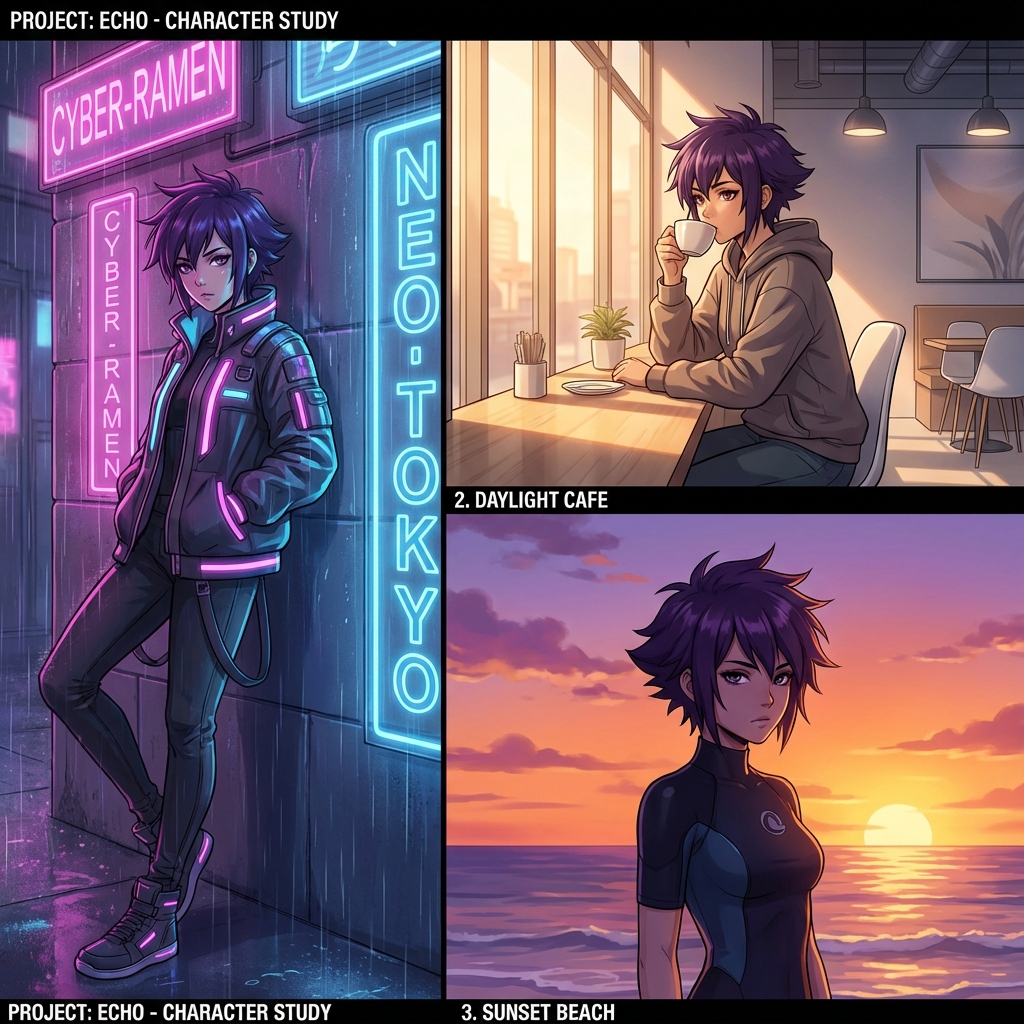
The Holy Grail of AI: Character Consistency
One of the hardest challenges in generative AI is keeping characters consistent across different scenes. In linear chat interfaces like Midjourney, you often lose the character's likeness when you change the prompt or style. You might get the same hair color, but the face structure morphs, or the outfit changes randomly.
For storytellers, comic creators, and game developers, this is a dealbreaker.
The Node-Based Advantage
With a node-based AI editor like Editora, you can separate your character's definition from the scene description. This "decoupled" workflow is the industry standard for professional AI asset production.
Step 1: define the Character Asset
Instead of typing "anime girl with purple hair" every time, you create a verified Character Reference Node. This uses a specific seed and a set of verified "IP-Adapter" weights to lock in facial features.
Step 2: The ControlNet Chain
Consistency isn't just about the face; it's about the pose and structure.
- Pose Node: Define the skeleton (standing, sitting, jumping).
- Depth Map: Define the 3D structure of the character.
- Character Ref: Inject the face identity.
Step 3: Iterate the Scene, Not the Character
Now you can change the "Background Prompt Node" from Neon City to Daylight Cafe to Sunset Beach. Since the character nodes are upstream and locked, the AI only regenerates the environment around them.
Pro Tip: Use a "Style Transfer Node" at the end of your pipeline to ensure the lighting matches the new background, blending the consistent character seamlessly into the new scene.
Start building your consistent character library today with Editora's visual canvas.